
Why Running a Business Feels Harder Now (And What You Can Do About It)
17 Jul, 2025
5 Mins Read


Getting your Google Business Profile suspended can be alarming and frustrating. One day your business is showing up on Google Maps and Search, and the next it’s gone, often without a clear explanation.
In this guide, we’ll demystify why suspensions happen, how you can reinstate your profile, and what steps you can take to prevent future suspensions. We’ll keep it jargon-free and practical, so even if you’re not a digital marketing expert, you’ll know exactly what happens behind the screens.
Google suspends Business Profiles primarily to uphold quality and trust. A suspension means Google found something about your profile that violates their guidelines or seems suspicious.
Google wants to make sure all listings represent real, legitimate businesses, so anything that looks fake, misleading, or against the rules can trigger a suspension.
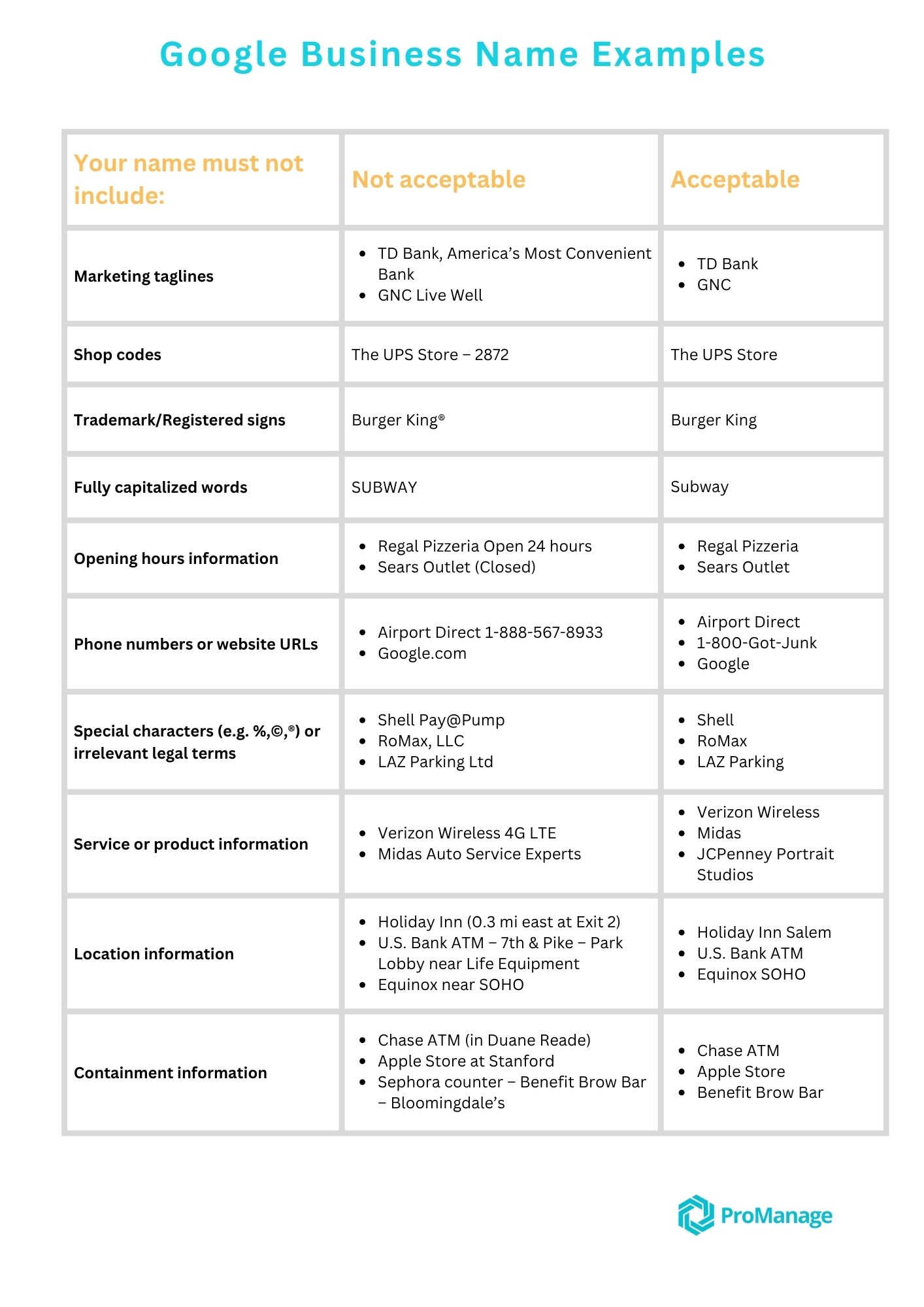
Using a business name on your profile that doesn’t match your real business name or providing false contact details can lead to suspension. For example, stuffing your profile name with keywords or marketing slogans (instead of your actual registered business name) is a big red flag. Make sure your name, address, phone number, and other details are consistent with your real-world business.
Find business name examples below:
Google requires a valid physical address for most businesses. Using a P.O. box, a UPS store, or a virtual office as your address is not allowed and can get you suspended. Similarly, if you run an online-only business with no physical storefront or service area, you’re not eligible for a Google Business Profile.
Service-area businesses (like plumbers or mobile locksmiths) must hide their address and specify their service region. If you are to display a residential address or an address where customers can’t actually visit, Google may suspend the listing.
Each business location should only have one profile. If you create multiple listings for the same business or address, that’s a violation. Duplicate profiles confuse customers and are against Google’s rules. Even if your attempt was to get more visibility, it will backfire with a suspension. Always maintain one accurate profile per business location.
Certain industries (like locksmiths, lawyers, plumbers, HVAC services, and other home services) see a lot of spam and fake listings, so Google is extra vigilant with them. If you’re in one of these high-risk categories, a minor issue might trigger a suspension “just because of the industry you’re in”. It’s crucial to follow all the guidelines strictly if you operate in these fields, as Google may suspend first and ask questions later to protect users from scams.
Did you recently sit down and make a bunch of edits to your profile, like changing your business name, address, and hours all at once? Rapid, significant changes can look suspicious to Google’s algorithm and sometimes trigger an automatic suspension.
This can even happen when you’re doing the right thing - for example, switching your profile type from a storefront to a service-area business (which requires removing your address) has been known to cause an immediate suspension as Google double-checks the change. To avoid this, make changes carefully and be prepared to verify any new info.
Google will suspend profiles that have content violating their policies. This could mean inappropriate or irrelevant posts, banned products/services, or even fake reviews on your listing. Additionally, if your business hours or address on Google don’t match what’s on your official website or other directories, it can raise flags. Always ensure your Google profile information aligns with your actual, current business information to build trust.
Anything that goes against the official Google Business Profile guidelines can lead to a suspension. This includes tactics like adding keywords or city names to your business name, listing a fake second location to cover more areas, using URL redirects (e.g. linking your website field to a social media page or another site instead of your own domain), or engaging in banned practices (like review gating or incentivizing reviews). Google’s systems are constantly scanning for policy violations in order to “filter out illegitimate businesses” and show only honest ones.
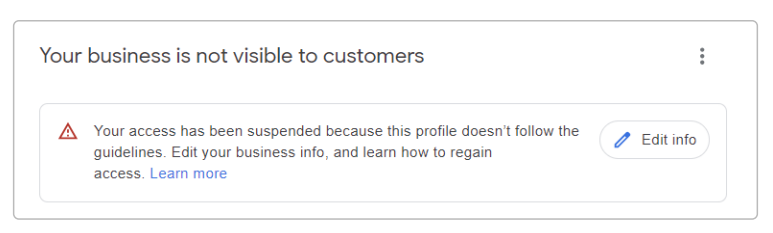
If your profile gets suspended, Google will usually mark it in your account and send you an email explaining that your "Business Profile has been suspended due to a policy violation." The notice might be vague, but it often hints at the issue (for example, it may mention “Suspended for quality issues” or list a “Violation type” like “deceptive content”). Google profile suspensions are fairly common and often fixable. The key is to identify what went wrong and address it before appealing.
Google can enforce different levels of suspension on your profile or account, including soft suspensions, hard suspensions, and account level suspensions.
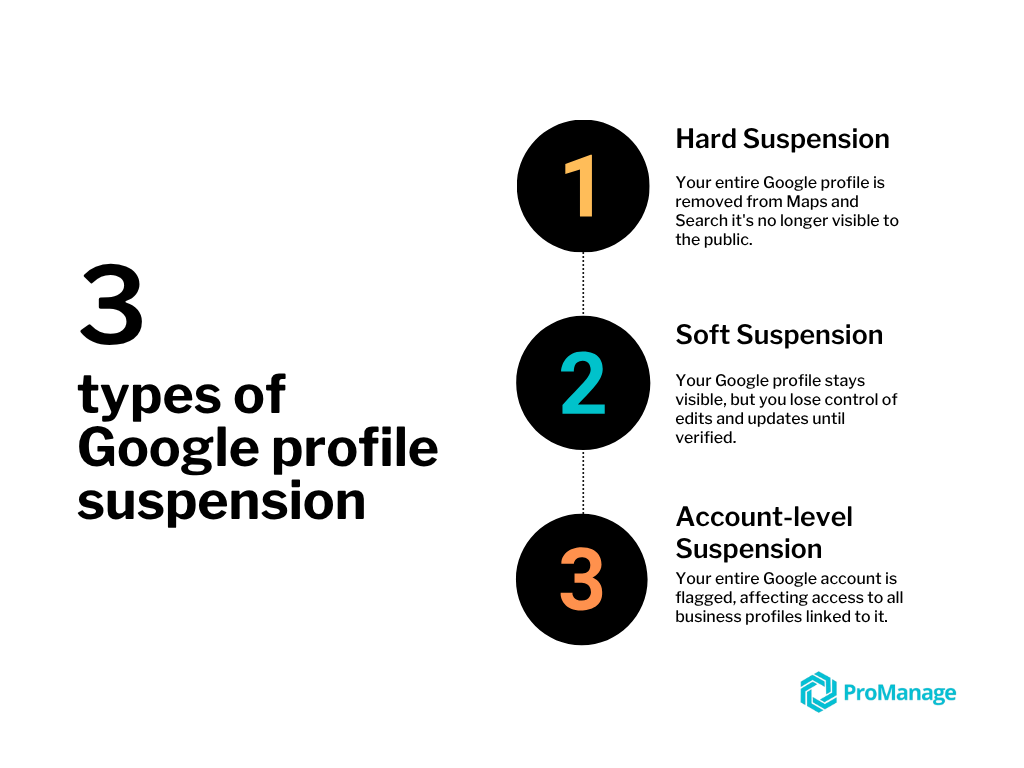
Your business listing becomes unverified but may still appear to the public in search results. In a soft suspension, when you log in to your Google Business Profile dashboard you’ll see a message that your access is suspended and you can’t make edits, even though customers might still see the listing online.
In this scenario, the profile is “disabled” for you as the owner but not completely removed from Google. This state is risky because while you can’t manage the information, the public can suggest edits – meaning your listing could get changed by outsiders while you’re locked out. Soft suspensions often happen due to minor guideline violations or verification issues, and they signal that you need to take action to regain full control.
Your business listing is completely removed from Google Search and Maps – it no longer shows up for your business name or location. This is the more serious type of suspension. A hard suspension usually indicates Google found a more serious issue, such as determining your business is ineligible or a blatant policy violation (for example, a fake business, or a company that doesn’t actually serve the area it claimed).
In a hard suspension, your Google Business Profile essentially vanishes from public view, which can be devastating for your visibility. You will need to address the problem and appeal to get the listing back.
In some cases, Google might suspend the Google account associated with the Business Profile – not just the profile itself. This typically happens if the owner’s Google account is flagged for serious or repeated violations. An owner account suspension means every listing owned by that account is removed, and you (as the owner) won’t be able to manage any profiles.
In effect, Google temporarily “bans” your entire account from the Business Profile system. If you have co-managers on the profile, the listing might still exist, but if the primary owner is suspended, it’s a big issue.
Sometimes managers from an agency you are working with or your staff members can get their individual account suspended due to policy violations. In that case, the listings remain online and other owners/managers retain access, while only the offending manager loses access.
Owner suspensions are more severe: Google will remove all locations under that owner’s account, along with their reviews and content, until the account is reinstated. (If this happens and you get the account back later, Google can reinstate the listings and may restore the reviews, but you might need to contact support to recover).
When your Google Business Profile is managed through ProManage, suspension risks are drastically reduced. Every listing is carefully checked before it goes live, ensuring that your business name, address, category, and contact information strictly follow Google’s guidelines. But the real difference lies in how we maintain your online presence beyond just setup.
We ensure consistency across every platform where your business is listed from your Google profile to your website, directories, and social channels. This sends strong trust signals to Google, confirming that your business is genuine, reliable, and established. If your profile is ever suspended despite these precautions, ProManage handles the reinstatement process fully. We take care of submitting appeals, resolving documentation, and tracking your case until it is restored.
To prevent such disruptions in the first place, every profile comes with round-the-clock protection. Any suspicious activity or unauthorized edits are blocked instantly, and we alert you right away. Your profile remains under constant watch, with zero compromise on safety.
If you're concerned about a suspended listing or want to make sure your business never disappears from search again, contact ProManage. We’ll show you exactly how we reduce your risk, speed up reinstatements, and keep your business visible, verified, and trusted online.
Delivering Digital Growth at Scale, for Your Business.


.png)